 Technicians Tab
In addition to the Invoice tab, where the parts are entered, three other tabs make up the invoice: Technicians, Equipment and Documents. While it is not necessary to use these tabs they do offer some excellent features that you might want to use.
The Technician Tab
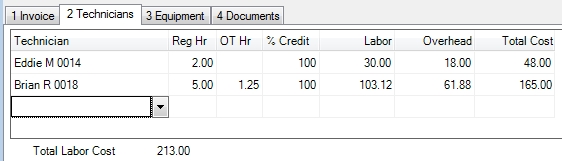
The Technicians tab shows which technicians worked on the invoice and the cost of their time to the company. This cost is strictly for reporting purposes; it has no financial repercussions. True labor cost can only come from payroll, but this information will flow onto all of the ESC Sales Reports and the Gross Profit field on the invoice itself. This allows you to see how much money you made today - without waiting a week or more for payroll to be processed.
If you are creating the invoice from a dispatch this information will come over from the times the technicians spent in a working status. If you are creating an invoice without attaching it to a dispatch you can simply add the technicians here.
At this point you can change some of the hours from regular time to overtime if you want. Overtime hours are calculated at 1.5 times the technician's normal rate. You can also adjust the amount of credit you want to give each technician for the invoice. This percentage will be multiplied by the invoice total to give you an accurate amount of the revenue each technician generated on the Tech Reconciliation Report.
The Equipment Tab
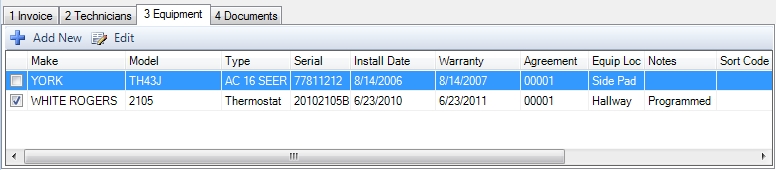
The Equipment tab allows you to associate the equipment that was worked on with the invoice. This equipment can then be printed on the invoice. Doing this will also cause the invoice to be linked to the equipment on the Equipment Report with History. This can be very handy because it can show how much money the customer has spent on a piece of equipment over time.
To attach a piece of equipment to the invoice, simply check the box next to it. If you add an inventory item that is set to post to the customer's equipment record, it will automatically appear here and be checked.
At this point you can also modify any equipment record for the customer by double clicking it. This can be handy if you want to write notes about the particular piece of equipment or update some of the custom fields.
The Documents Tab
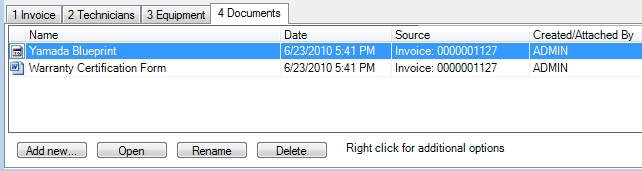
The Documents tab can be used to attach any files you want to associate with the invoice. This can range from a scanned copy of the invoice the technician gave the customer in the field to pictures or videos of the completed work. See this help topic for more details on how to attach and recall documents.
Next Step - If you have the customer's payment in hand go to Tendering a Payment. If you don't, jump to Completing the Invoice.
 How do I get to this screen?