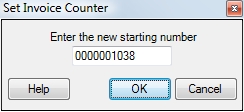
This field is used to set the invoice number that will be automatically assigned to the next invoice created. When pressing TAB or ENTER through the Invoice field on the Sales Invoicing screen, the invoice number that appears is determined by this counter. This counter can be changed by entering the desired number in this field. This number can still be overwritten, of course, on the invoice itself. Click Save to keep the changes made, or Exit to discard them.
Note: ESC was designed to be a true multi-user program. This means that it is possible for several people to be creating invoices at the same time. To accommodate this ESC automatically increases this counter the instant it is used, whether the record is saved or not. This can cause gaps in the invoice number sequence and is completely normal.
 How do I get to this screen?