ESC Version 10: Now is the Right Time
This year’s ESC Version 10 release focused around streamlining data entry and data flow. Changes to the customer and dispatch module make it easier than ever to manage customers and contacts, schedule and dispatch technicians, and make sure they are always prepared with the right parts and equipment.
Redesigned Customer Module
The streamlined customer entry screen makes it easier to enter new customers and gives you better control of your data.
- Keeping in touch with the correct contact is easier with space for six detailed contacts per location.
- Correspond directly via mail merge by clicking the letter icon next to the contact’s name and selecting the desired template.
- A ‘date added’ field is auto-filled for all new customer accounts, so you can see when each customer was added and filter reports by date ranges of when a customer was added.
- Attach a sales person to each customer so that invoices will be auto-assigned to the designated sales person.
- ESC will automatically pick the correct city and state for new customers when you enter their zip code, after you import the zip codes for the states you service.
- The customer search field auto-fills after a few characters, and in most situations, you will not need to open up the detailed search box.
- The new customer search screen is both easier to use and more powerful, now allowing you to also search by contact names and email addresses.
- The software now catches duplicate customers before they are created, even if the address is not exactly the same.
- You can eliminate duplicate customers by merging locations—transferring all equipment, history, dispatches, service agreements, attached documents and even invoices from one location to another—making it perfect for transferring information from builder to buyer.
- Making a record inactive prevents those particular customers or locations from showing in filtered lists and on reports, effectively hiding a customer while retaining your historical records.
Expanded Dispatch Module
The redesigned dispatch entry screen makes sure that dispatched technicians are properly equipped for each job site they visit.
-
The redesigned dispatch screen is easier to use and lets you browse through dispatch notes for a range of dispatches within one screen, and the improved layout and default sort option keep dispatches from appearing multiple times.
-
The date and time stamp and spell checking is now available in the dispatch notes field.
-
Printed dispatch tickets are customizable with the new layout designer. You can place your logo on your dispatches and include an area for your technicians to note their work. There are sample templates available to help get you started.
-
Attached equipment is displayed in a separate tab, which allows equipment to be attached, added and edited all in one screen.
-
A price field displays on the Parts tab, letting you put prices on parts attached to the dispatch. These parts and prices can then be transferred to the mobile clients and printed on dispatches.
-
A search field now displays on the Dispatch Board, letting you easily find any dispatch by entering any part of the location name or address.
Service Agreement Updates
Updates to the service agreements module increase the connectivity among the agreement, the dispatch it generates, and the items in inventory.
-
Parts added to service agreement tasks now flow automatically to the Parts tab on the dispatch with a zero price, and then into the related invoice. This ensures the technicians know what they need to take with them to complete the job, and so the parts will be removed from inventory.
-
Now there is the ability to post agreement dispatches for a particular customer, which simplifies combining service work with planned maintenance.
Inventory Enhancements
Changes to the inventory screens simplify the process of entering, adjusting, and managing inventory.
-
The inventory entry screen opens in a separate window that enables you to enter parts on the fly.
-
The redesigned screen also features a tabbed layout that groups similar items together and makes the screen easier to use.
-
Alternate parts now are displayed as a tab on the screen.
-
When searching for inventory parts, inactive parts are hidden by default.
-
Import all the parts ESC perceives to be in a warehouse onto the Adjust Inventory screen. The quantities can be automatically set to zero, making this the perfect tool for entering physical inventory counts.
Enhanced Reporting Capabilities
Alterations to the reporting functions let users better view, compare, and edit reports.
-
Users can now view an unlimited number of reports at once. This makes comparing reports a breeze.
-
Closing a report now returns you to the module you were working in, but you can still change the report criteria when previewing by clicking the filters button in the toolbar.
Web Front Office Overhaul
The Web Front Office received a major facelift in this version. The entire interface has been updated to look more modern, and several new features have been added.
-
There is a new connections server, which has been completely redesigned to make it easier to use.
-
A status light indicates if any portion of the connections server is not configured correctly.
-
Run multiple reports directly from within Web Front Office.
-
Expanded set up screens let you add technicians, configure dispatch boards, and add inventory items.
-
Recall existing invoices and change or print them.
-
Dispatch ticket printing is now supported, enabling technicians to print dispatches while in the field.
Mobile Client Changes
The mobile client also has many expanded features to make technicians even more efficient in the field.
-
Inventory items entered on the parts tab of the dispatch entry screen flow to the invoice on the mobile client for the first technician who downloads the dispatch.
-
Service agreement information is sent to the dispatch tab on the mobile client, allowing your technicians to see the agreement type and all sub-tasks.
Accounting Updates
There have also been improvements to the accounting integrations, as well as expanded features and forms.
-
You can now modify invoices posted to QuickBooks that no longer exist. This solved the common issue of deleting an invoice in QuickBooks that was posted there by ESC. Now you can easily recover from this mistake by making sure all the transactions that were sent to QuickBooks are deleted.
-
There is now the ability to print 1099 forms.
-
There is also improved compatibility of the direct deposit setup screens.
|
|
Available
Now
ESC Version 9.1
Following our tradition of Software
Enhancements, below please find a brief
overview of some examples of the latest
changes to Version 9.1 below:
Core ESC Software
|
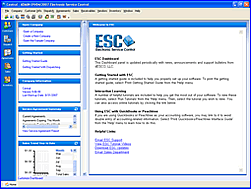
Throughout ESC, we have
implemented many usability
enhancements in version 9.1. We
have converted and updated over
200 screens to the latest
Microsoft .NET technology, as
well as updated every report in
ESC to a new reporting solution.
These enhancements lay the
groundwork for many new features
in this release and future
releases.
|
 |
-
New Spell Check capabilities added to
dispatch notes, description field in
invoicing location notes in customer
information and invoice notes on the
laptop mobile client
-
Improved and enhanced barcode
capabilities for quick inventory entry
in the adjustment screen, warehouse
transfers and inventory job transfers
-
A new feature in Adjust Inventory
allowing users to import adjustments that
were done on the mobile client
-
Added the ability to print out transfer
tickets from the warehouse transfer screen
and automatically save the transaction
-
Additional option allowing the exporting of
multiple price books from ESC to XML for
quick loading of inventory databases on a mobile
client
-
Increased a variety of field lengths
throughout the software for example: Job
names, Lot numbers, PO field in Dispatch
Entry and Sales Invoicing; as well as, the
allowed part number length
-
Added an “Invoices/Quotes” tab in the
Customer Qualifications allowing you to see
all quotes and invoices for that customer’s
location
-
Completed Vendor Module Redesign, allowing
more information as well as unlimited locations
per vendor, including 6 contact spaces per
location and a notes area that is shared
between all locations
-
Added a “contract counter” to the Contract
Value Report to quickly see how many
contracts are listed
-
Added an option to show previously billed
invoices that are attached to the quote
-
You can now use the arrow keys to move
fields around in the Layout Designer.
You may also use the Ctrl + arrow key to
trim the field
-
“SMTP Port” selection allows you to choose
which SMTP port you want for e-mailing
invoices or paging
-
Inclusion of a “Sales Person” filter to the
Job Report, Job Profit, Loss Detail,
Job Profit and Loss Summary reports
-
Automatic software updates: ESC will now
automatically update the software whenever
new releases are available. You simply
select the link and it will then shut ESC down,
download and apply any new patches and then
automatically re-launch the ESC Software, it
can’t be any simpler
|
ESC Mobile |
 |
-
Redesign of the ESC Mobile Client allowing
screen resizing for the laptop client
-
Ability to import quotes from ESC to
the mobile client
-
Ability to create quotes on the mobile
client
-
Added the ability to import adjustments
made on the mobile client through the
ESC adjustment screen
-
Addition of
Magtek credit card swipe unit to
work with a tablet PC
-
Discounts now
supported on the mobile laptop client
|
ESC Front Office |
 |
-
Addition
of the Equipment tab allowing equipment
entry
-
Ability to generate sales invoices through
Front Office as done through mobile
-
Ability to print invoices from Front Office
using invoice forms from ESC
-
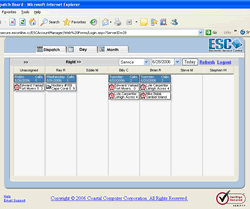
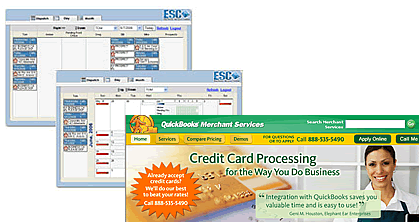
Addition of a new Silver light dispatch
board
-
Ability to transfer parts from the “parts”
tab to the “invoice” tab on dispatch entry
screen
-
Addition of Equipment tab to the dispatch
entry screen
-
Addition of the Qualification screen
|
Integrated Apps |
 |
-
There is also the ability to match or add
employees via the QuickBooks or Peachtree
Connection Integration Wizard
-
Improved “customer note” handling
between ESC and QuickBooks
-
Added an option in System Setup Progressive
Billing to show previously billed invoices
that are attached to the quote
|